





Yamaha CD-C603 5-Disc CD Changer
We are an authorized Yamaha dealer!
Email Your Question
Pairs well with
Free Shipping
We only ship within Canada. Items purchased online qualify for free shipping!
30 Day Returns
All products are eligible for returns within 30 days. All original packaging is required.
Installation & Calibration
Ask about our installation services on home theatre & stereo equipment along with automation.
Yamaha CD-C603 5-Disc CD Changer
Overview
Constantly swapping a single disc when an album ends gets old fast, especially if you've still got a shelf of CDs worth revisiting. The Yamaha CD-C603 keeps five albums queued up at once, so you spend less time changing discs and more time listening.
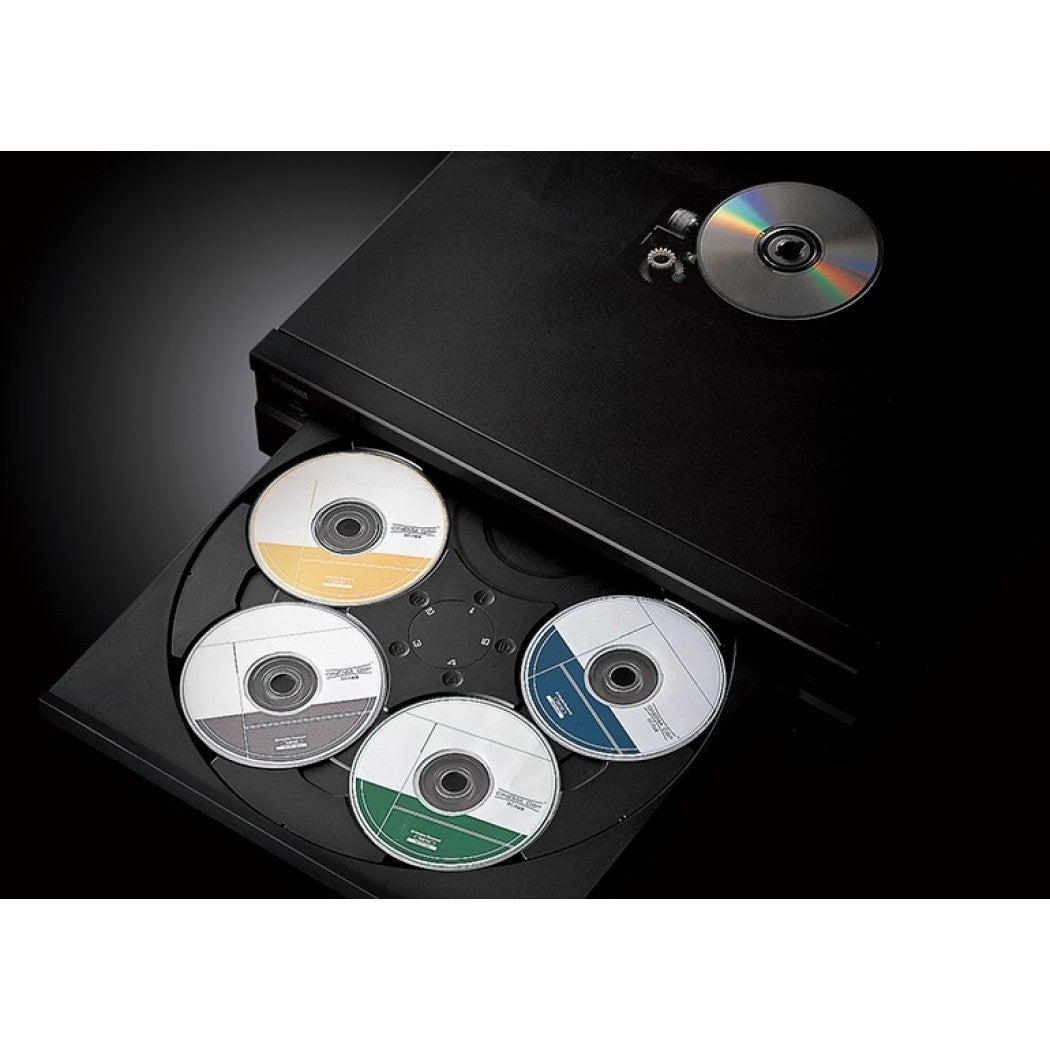
The CD-C603 is a 5-disc CD changer from Yamaha's Hi-Fi component lineup, built around short signal paths, sophisticated circuitry, and an intelligent digital servo and laser pickup floating mechanism for clean, accurate playback. Its fully-opening tray loads all five CDs at once, and PlayXChange lets you swap out four of them while the fifth keeps playing, so a change of pace doesn't mean an interruption. Beyond CDs, it also reads CD-R and CD-RW discs and plays MP3, WMA, AAC, and WAV/FLAC files (up to 96kHz/24-bit for WAV/FLAC) from a USB drive connected to the front panel.
Pure Direct mode shuts down the digital audio output and display to cut noise interference and get the cleanest possible signal from the analog output, and RCA and optical outputs mean it connects to almost any stereo or AV receiver already in your rack. A 3.5mm remote in/out jack also lets it join a chain with other Yamaha components for whole-system remote control.
Simcoe Audio Video Insight
For clients in Central Ontario bringing a CD collection into a modern equipment rack, the CD-C603's optical output is the easy way to route into an AV receiver or DAC-equipped amp alongside newer digital sources, without hunting for an analog-only input. And because the remote in/out jack lets it share a single IR receiver with other Yamaha components in the same closed cabinet, it fits cleanly into custom installs where the front panel isn't visible day to day.
More Info
Why the Yamaha CD-C603 Stands Out
5-Disc Carousel, Fully-Opening Tray
Loads five CDs at once so you can queue up an evening of music without repeated disc changes.
PlayXChange Disc Swapping
Swap out four discs while the fifth keeps playing, so changing up the lineup doesn't interrupt what's already spinning.
Plays CDs, USB, and Hi-Res Files
Reads CD, CD-R, and CD-RW discs, plus MP3, WMA, AAC, and WAV/FLAC files up to 96kHz/24-bit from a front-panel USB drive.
Pure Direct Mode
Shuts down the digital audio output and display to cut noise interference and deliver the cleanest possible analog signal.
RCA and Optical Outputs
Connects to almost any stereo or AV receiver already in your rack without extra adapters.
Remote In/Out for Multi-Component Control
A 3.5mm remote in/out jack lets it share a single IR receiver with other Yamaha components in the same rack.
Buyer's Guide
Who It's For
- The CD Collector: still has a shelf of albums and wants to rotate through five at a time without repeated disc changes.
- The USB Ripper: wants one tray that handles both physical CDs and a USB drive of ripped hi-res files.
- The Custom Install Client: building a closed-cabinet rack system and wants remote-chaining with other Yamaha components plus a clean digital output option.
How It Compares
The CD-C603 sits alongside the single-disc Yamaha CD-S303 in Yamaha's current Hi-Fi lineup. Both share the same 105dB signal-to-noise ratio, 96dB dynamic range, and 0.003% harmonic distortion, but the CD-S303 adds a coaxial digital output that the CD-C603 doesn't have, while the CD-C603 trades that extra output for the 5-disc carousel and PlayXChange disc-swapping. Anyone who wants extended, uninterrupted playback across multiple albums is better served by the CD-C603; the CD-S303 remains the more compact, single-disc option with a wider output selection.
Yamaha CD-C603 5-Disc CD Changer Specifications
| General Information | |
|---|---|
| Model | Yamaha CD-C603 |
| Type | 5-Disc CD Changer |
| Audio | |
| Disc Compatibility | CD, CD-R, CD-RW |
| Compatible File Formats (USB) | MP3, WMA, AAC, WAV*, FLAC* (*up to 96kHz/24-bit) |
| Signal-to-Noise Ratio | 105 dB |
| Dynamic Range | 96 dB |
| Harmonic Distortion | 0.003% |
| Frequency Response | CD: 2 Hz–20 kHz; Data/USB: Fs48kHz 2Hz–22kHz, Fs96kHz 2Hz–44kHz (-3dB) |
| Connectivity | |
| Audio Outputs | Unbalanced RCA, Optical |
| USB Input | Front Panel |
| Remote In/Out | 3.5mm (x1 In, x1 Out) |
| Physical Specifications | |
| Dimensions (W x H x D) | 17-1/8" x 4-5/8" x 16" (435 x 117 x 406 mm) |
| Weight | 12.3 lbs (5.58 kg) |
| In the Box | |
| Included Accessories | Remote Control |